


Jharbhoomi Jharkhand Land Records
Jharbhoomi is Jharkhand's official land record portal, run by the Department of Revenue, Registration and Land Reforms with the National Informatics Centre. It lets you check khata, khatian, khesra and Register-II details online, replacing manual searches under the Digital India Land Records Modernisation Programme. Verify ownership on Jharbhoomi before buying property in Jharkhand.
Purpose of Jharbhoomi
- Provide land record details (khasra and khata) to the citizens of the state.
- Transfer of land for schemes and projects.
- Digitisation of revenue and registry records.
- Online mutation of lands.
- Online payment of land tax.
- Prevention against land- or property-related fraudulent activities.
- Access to the Land Bank, which shows government land available for allotment.
How to Register as Khatian
Step 1: Go to the official portal of Jharbhoomi and click on the "See Account & Register-II" tab.
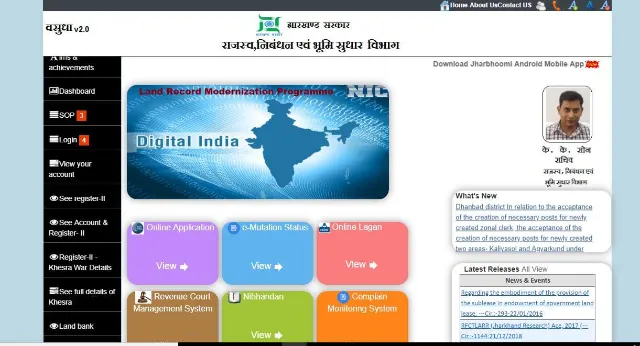
Step 2: Select "Khatian" and fill in the required fields.
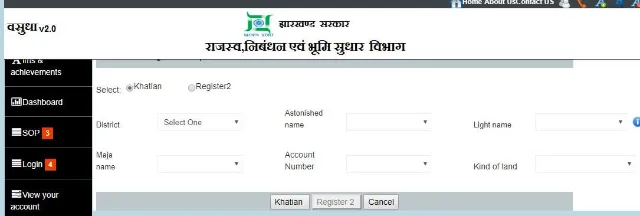
Step 3: The details you need to provide include name of the district, area name, land type, and account number, among others.
Step 4: Click on the "Khatian" button.
How to Register as Register-II
Step 1: Go to the official portal of Jharbhoomi and click on the "See Account & Register-II" tab.
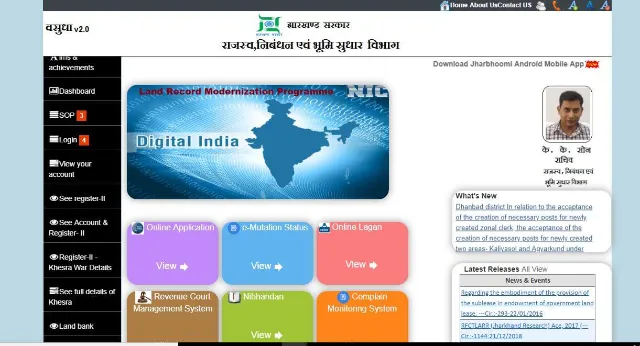
Step 2: Select "Register 2" and fill in the required fields.
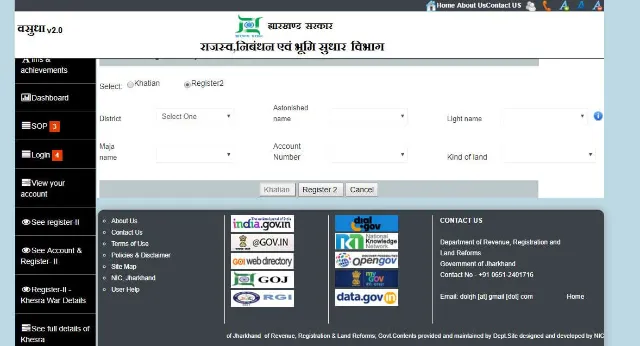
Step 3: The details you need to provide include name of the district, area name, land type, and account number, among others.
Step 4: Click on the button "Register 2" to complete the process.
How to Log in to Your Account
Step 1: Go to the official portal of Jharbhoomi and click on the "Login" button located on the left-hand column of the page.
Step 2: Clicking on any of the tabs under the "Login" tab will take you to the following page.
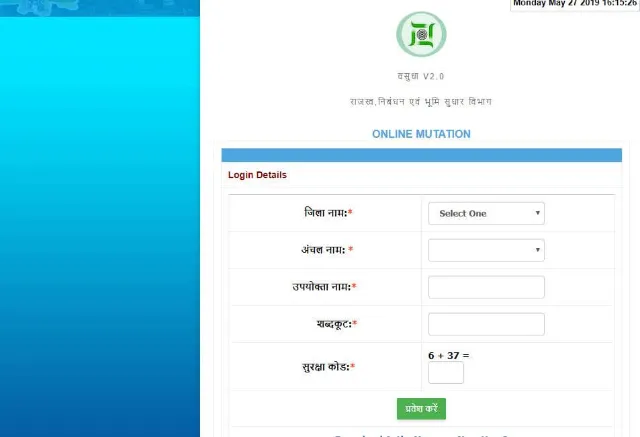
Step 3: Fill in the required fields to log in.
How to Know Your Land Record Online
Step 1: Visit the official portal of Jharbhoomi.
Step 2: Click on the "View your account" tab located just below the "Login" tab.
Step 3: From the digital map, select the appropriate district where the property or land is located.
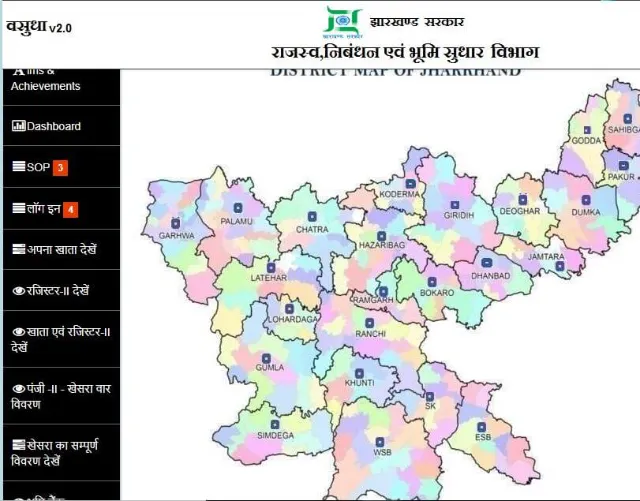
Step 4: Upon selecting the district, the block map of that district will appear on your screen.
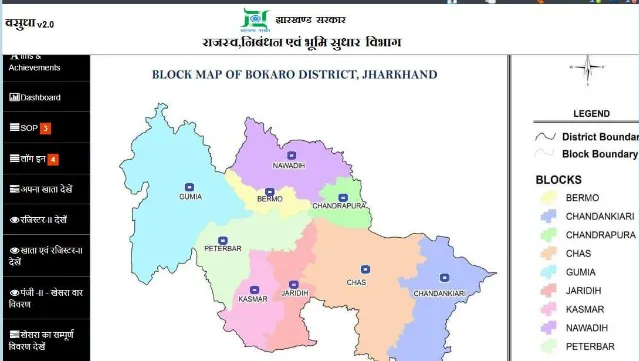
Step 5: Select the concerned block.
Step 6: You will be redirected to a page where you have to select "Halka" or "Light" (if you translate the page to English), and the type of land from the dropdown menu.
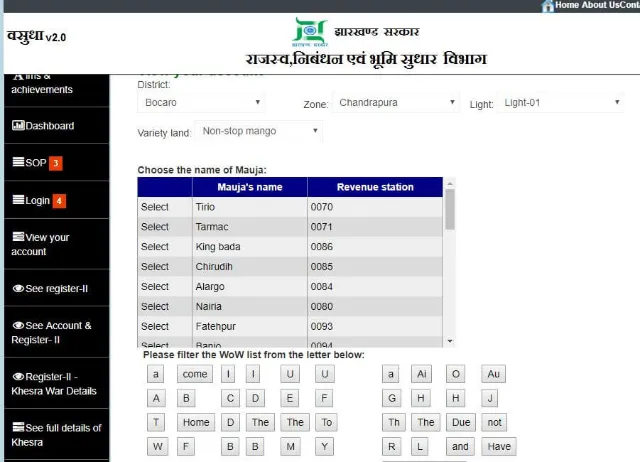
Step 7: You can view or search by Mauja name, Mauja as per Khesra numbers, account number, or account holder name.
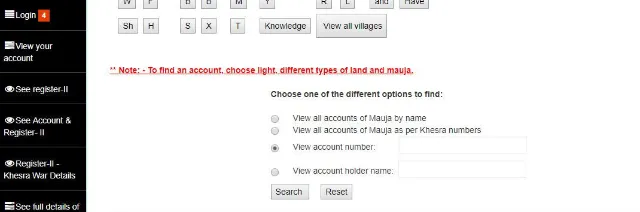
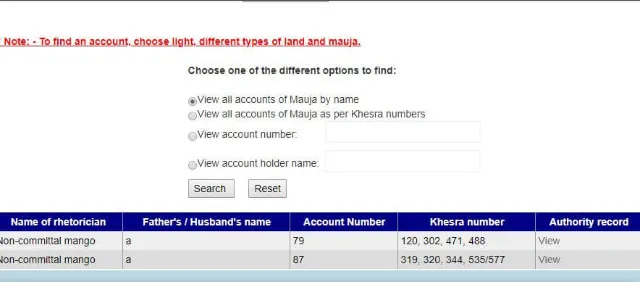
Step 8: Once you are done selecting, click on the "Search" button.
Step 9: The revenue record details will appear on your screen.
Jharbhoomi also includes a Bhu-Naksha tool that shows the digital plot map for a khata or khesra number, so you can check plot boundaries and dimensions alongside the written land record.
How to View Khesra Details
Step 1: Visit the official portal of Jharbhoomi.
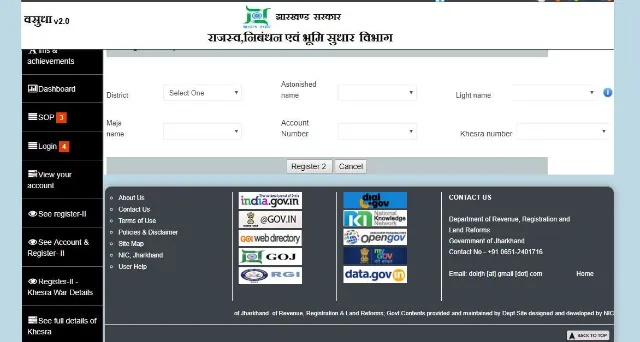
Step 2: Click Khesra details.
Step 3: Fill in the required fields along with the Khesra number and click on the "Register" button to complete the process.
Grievance Registration Form
Step 1: Go to the official Jharbhoomi portal and open the "Parishodhan" grievance option.
Step 2: Fill in the required fields along with the complaint/grievance.
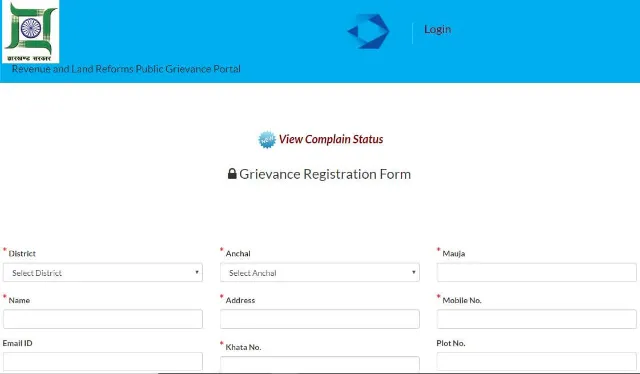
Step 3: Click the "Submit" button to compete the process.
For queries the online form doesn't resolve, the Department of Revenue, Registration and Land Reforms can also be reached on 0651-2446066 or by email.
Follow the aforementioned steps to get your Jharkhand land record details in a hassle-free manner.
How to use Jharbhoomi portal for online tax payment
In order to make tax payment online through the Jharbhoomi portal, you need to follow the steps listed below:
- Visit the official Jharbhoomi portal.
- Click on 'Online Lagan' on the homepage
- Click on 'Pay Online'
- Select the appropriate options from the drop-down menu and enter the details asked for
- Enter the captcha code and click on 'Search'
- The details will be displayed on the screen
- You can move ahead to make the payment using the online gateway
How to check application status on Jharbhoomi
To check the application status on the Jharbhoomi portal, you will need to follow these steps:
- Visit the official Jharbhoomi portal.
- Click on 'Online Application' on the homepage
- Login using the email ID and password and check the status of the application (In case, you are a new user, you will need to register yourself before logging in)
Find Land Records in Other States
Schemes and Acts
- Pradhan Mantri Awas Yojana - Urban - PMAY(U)
- Pradhan Mantri Awas Yojana Gramin Online (PMAYG)
- Pradhan Mantri Awas Yojana - Urban 2026
- Real Estate (Regulation and Development) Act, 2016
- Stamp Duty and Registration Charges 2026
- Encumbrance Certificate (EC)
- Delhi Development Authority (DDA) Housing Scheme
- Land Records 2026
FAQs on Jharbhoomi Jharkhand Land Records
1.What is Jharbhoomi?
Jharbhoomi is the Jharkhand government's official online portal for land records, run by the Department of Revenue, Registration and Land Reforms with the National Informatics Centre. It lets residents check khata, khatian, khesra and Register-II details for land anywhere in the state. The portal aims to make Jharkhand land records transparent and easy to verify before a property purchase.
2.What can I do on the Jharbhoomi portal?
Jharbhoomi lets you view land record details, apply for online mutation, pay land tax and register grievances related to Jharkhand land records. It also supports digitisation of revenue and registry records for the state. Citizens can use these services without visiting a revenue office in person.
3.How do I register as Khatian on Jharbhoomi?
On the Jharbhoomi portal, go to the "See Account & Register-II" tab and select "Khatian". You then fill in details such as district, area, land type and account number before submitting the form. This creates your Khatian record on the Jharkhand land records system.
4.How do I register for Register-II on Jharbhoomi?
To register for Register-II on Jharbhoomi, open the "See Account & Register-II" tab on the portal and choose "Register 2". Fill in the district, area, land type and account number, then submit the form to complete registration. Register-II is a separate land record category from Khatian on the same Jharbhoomi system.
5.How do I log in to my Jharbhoomi account?
Click the "Login" button on the left-hand column of the Jharbhoomi homepage and choose the relevant login tab. You'll then be taken to a form where you enter your credentials to access your Jharkhand land record account. Login is required for services such as tracking applications and viewing saved records.
6.How can I check my land record online on Jharbhoomi?
On Jharbhoomi, select "View your account", then choose your district and block from the digital map shown on screen. You can then search by Mauja name, Khesra number, account number or account holder name to bring up the Jharkhand land record. The revenue record details appear on screen once you submit the search.
7.How do I view Khesra details on Jharbhoomi?
Select the Khesra details option on the Jharbhoomi portal and fill in the required fields along with your Khesra number. Submitting the form displays the Khesra-wise land record for the plot you searched. This is useful for confirming plot-level details before a land transaction in Jharkhand.
8. Does Jharbhoomi show the land map or plot boundary?
Yes, Jharbhoomi includes a Bhu-Naksha tool that displays the digital plot map for a given khata or khesra number. This lets you check plot boundaries and dimensions alongside the written Jharkhand land record. It's a useful cross-check before relying on the record alone.
9.How do I pay land tax (lagan) online through Jharbhoomi?
On the Jharbhoomi portal, select "Online Lagan" followed by "Pay Online", then choose the relevant options and enter the requested details. After entering the captcha and searching, the amount due is displayed and can be paid through the online payment gateway. This lets Jharkhand landholders pay land revenue without visiting an office.
10.How do I check my application status on Jharbhoomi?
Select "Online Application" on the Jharbhoomi homepage and log in with your registered email ID and password. Once logged in, you can view the current status of any application you submitted through the Jharkhand land records portal. New users need to register on the portal before they can log in.
11.How do I raise a grievance about a Jharkhand land record?
Jharbhoomi provides a grievance option where you can submit your district, name, contact details and a description of the issue. Once submitted, the complaint is logged and can be tracked for resolution through the same portal. This route is meant for land record issues that other Jharbhoomi services don't resolve.
12.Can I check land records for states other than Jharkhand?
Yes, most Indian states run a similar online land record portal, such as Jamabandi in Haryana, Banglarbhumi in West Bengal or Bhulekh in Bihar. Jharbhoomi is Jharkhand's equivalent of these state-run systems. Each portal only covers land records for its own state.
13.Why should I check the Jharbhoomi land record before buying property?
Checking a property's Jharbhoomi land record confirms the registered owner's name, khata number and plot details before you commit to a purchase in Jharkhand. This reduces the risk of buying land that is disputed or incorrectly recorded. It is a recommended step alongside other legal checks such as the encumbrance certificate.
14. Is there a fee to check land records on Jharbhoomi?
The Jharbhoomi portal is free for citizens to search and view Jharkhand land records online. Charges may apply for certain services, such as certified copies or during formal mutation and registration, and these vary by application type. Check the relevant section on the portal for current charges before applying.

Disclaimer
Credit Card:
Credit Score:
Personal Loan:
Home Loan:
Fixed Deposit:


Copyright © 2026 BankBazaar.com.